Building Your Business Website: From Idea to Launch
A practical roadmap for your company website, from defining its goal and writing the content to choosing how to build it, testing, launching and keeping it healthy.

To build a business website that actually brings in work, follow the stages in order: define the goal and audience, write the content, choose a domain, hosting and build method, then design, develop, test, launch, measure and maintain. Projects that run late or over budget rarely stumble on the code. They stumble at the start, on a vague goal, missing copy, or big decisions made after design has begun. This guide maps the whole route and points you to a dedicated article at each stage.
1. Define the website's goal first
A website is a tool for a business goal, not an end in itself. Before you talk to a designer or developer, answer one question: what should a visitor do after reading? The answer shapes the number of pages, the order of content and even the way the site is built. The most common goals for company websites are:
- Generating enquiries: a phone call, a WhatsApp chat or a quote request form. This is the usual goal for service businesses such as contractors, clinics, consultancies and training centers.
- Selling online: here you need a store with a cart, payments and shipping, not a brochure site. The complete guide to starting an online store covers that route.
- Building trust: firms that deal with large clients or tenders need a site that shows experience, projects and accreditations, because buyers check them before the first meeting.
- Recruitment or customer support: careers pages, FAQs or order tracking take pressure off the phone line.
Pick one primary goal and one primary call to action that repeats on every page. Secondary goals are fine as long as they don't compete with it. Illustrative example: a dental clinic in Dubai wants bookings, so a "Book on WhatsApp" button sits at the top of every page, the secondary goal is presenting the doctors and treatments, and the number to watch is monthly WhatsApp conversations started from the site.
Know your audience, their devices and their language
Write a short profile of your typical visitor: who they are, what they ask before buying, and which device they mostly use. In many consumer sectors across the Gulf and Egypt the phone comes first, but check rather than assume; if you already have a site, look at your analytics. Then decide on language: Arabic, English or both. If both, decide now, because it affects URL structure, design, content and budget. The details are in building a bilingual Arabic-English website.
Sketch the page map
A sitemap is a list of pages and how they relate, and it's the basis of any serious quote. Typical pages for a company site:
- Home: answers three questions on the first screen: what you offer, who it's for, and what to do next.
- About: story, team, licensing and experience, written plainly without inflated claims.
- Services: one page per main service beats a single page listing everything, because each page can answer its own questions in depth and rank for its own searches.
- Work or projects: real examples with photos and a short problem, solution and result.
- Contact: phone, WhatsApp, form, address, map and opening hours.
- FAQ and privacy policy, plus terms if you sell online or collect personal data.
Also think a year or two ahead: a blog or knowledge hub, a careers page, a branch in another country. Planning for them now is cheaper than restructuring later.
2. Content first, then design
Good design is built around real content. Placeholder text hides problems: a three-word heading in the mockup becomes twelve words in real life, and a section designed for six services ends up holding two. Arabic and English also differ in length, so a layout that works in one language can break in the other. Content is also the most common cause of delay: a technically finished site sits waiting for copy and photos for weeks.
Prepare these before design starts, or alongside it:
- Copy for every page on the map, written for your reader in short sentences, with headings that state the benefit of each section.
- Real photos of the team, premises and work. Generic stock photos weaken trust when they dominate a site.
- Logo and brand files in web-friendly formats, above all a vector version of the logo. If your brand isn't defined yet, start with visual identity.
- Real customer questions from phone calls and WhatsApp chats. They're the most honest material for service pages.
- Genuine testimonials, used with the customer's permission.
- Consistent contact details: name, address and phone written exactly as they appear on Google Maps and your social profiles.
For copy that works for readers and search engines alike, see writing for search engines without losing the reader.
3. Domain, hosting and SSL
The domain is your address. Choose something short that is easy to say and spell over the phone, and avoid hyphens and confusing numbers. A .com may suit you, or a country domain such as .ae, .sa, .kw or .eg if your market is local; registration rules for country domains vary, so check them with the registrar. Most importantly, register the domain in the company's name, in an account the company controls, not in an employee's or freelancer's personal account. It's one of the most painful problems when a developer relationship ends. Turn on auto-renewal and the transfer lock.
Hosting is the server your site runs on, and the right type depends on how you build. Website builders include hosting, content management systems need solid hosting that supports their database and language, and custom projects may need a virtual server or a cloud service. Server location and a content delivery network (CDN) affect speed for visitors in the Gulf and Egypt.
An SSL certificate lets your site run over HTTPS so traffic between visitor and server is encrypted, and browsers warn users about unencrypted pages, especially ones with forms. Many hosts provide certificates free. Add a business email on your own domain too; it earns more trust than a free webmail address. The full picture is in choosing hosting, a domain and an SSL certificate.
4. Choose how to build it
There are three main ways to build a company website, and each has its place:
| Criterion | Website builder | Content management system | Custom build |
|---|---|---|---|
| Examples | Wix, Squarespace | WordPress | Code and framework chosen for the project |
| Time to launch | Fastest | Moderate | Slowest |
| Upfront cost | Low | Moderate | Highest |
| Running cost | Recurring subscription | Hosting, updates and maintenance | Hosting and developer maintenance |
| Flexibility | Limited to the platform's features | Wide, through themes and plugins | Almost complete |
| Moving elsewhere later | Often difficult | Possible | Possible if the code is handed over |
| Best for | Small sites, quick landing pages | Sites with frequently updated content | Special requirements or integration with internal systems |
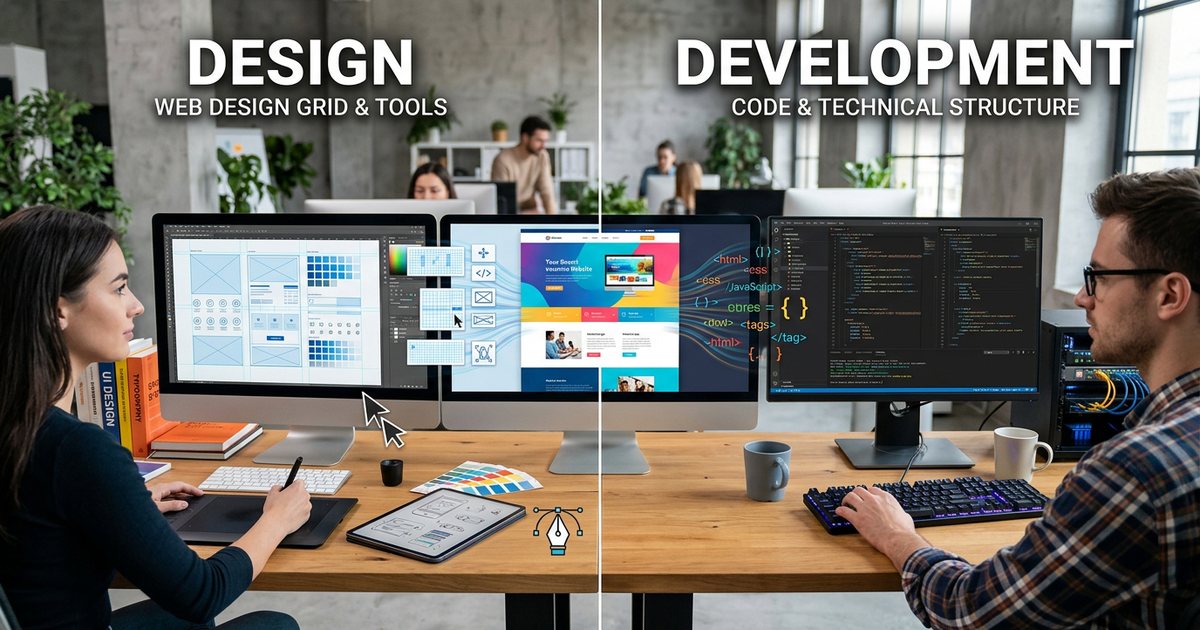
Don't choose on upfront price alone. Ask who will update the content and how often; whether you need special features such as booking, a client portal, or a link to your accounting system or CRM; what the yearly running budget is, not just the build budget; and whether you can move the site if you change provider. The guide to content management systems explains when a CMS fits and when it doesn't. If you're weighing a mobile app instead of, or alongside, the website, read app or website? first. And to understand who does what on the team, web design vs. web development explains the designer's role, the developer's role and where they meet.
5. Design: from structure to final screens
Design usually moves through three stages, each signed off separately so you never go back to zero:
- Wireframes: plain, colourless layouts that set the order of sections on the home page and at least one inner page, on mobile first and then desktop. This is where you debate priorities, not colors.
- Visual design: applying your identity (colors, fonts, imagery) to the approved wireframes, then reviewing it on real devices at real sizes, not only on the designer's large monitor.
- Clickable prototype: optional, but useful for testing navigation and menus before any code is written.
What makes a good company site design? A first screen that says clearly what you do and for whom, one prominent call to action with no competing buttons, a visual hierarchy that guides the eye, readable Arabic and Latin type at a comfortable size and line height, and enough contrast between text and background. The fundamentals are in UI and UX design fundamentals. Since most visits may come from phones, every page must work on small screens as well as large ones, which is the subject of responsive web design. And don't leave web accessibility for the end: contrast, button sizes and image descriptions are design decisions from day one.
Agree the number of revision rounds up front, and collect feedback from one decision-maker in one document. Scattered comments from five people over WhatsApp are the fastest route to endless revisions.
6. Development: turning designs into a working site
This is where the design becomes code: a front end built with HTML, CSS and JavaScript that visitors see, and a back end that handles forms, the database and the admin panel. You don't need to code yourself, but knowing the basics helps you talk to your developer; start with HTML, CSS and JavaScript basics. If you decide to learn to build sites yourself, follow a realistic plan for learning to program from scratch.
Points to agree with your developer before work starts:
- A staging environment: a separate copy for building and review, so nobody edits the live site directly.
- Where form submissions go: which inbox, whether they're also saved to a sheet or CRM, and whether the visitor gets a confirmation.
- Call and WhatsApp buttons: direct links that open the app on mobile with a pre-filled message naming the page the visitor came from.
- Speed from the start: image sizes and formats, number of fonts, third-party scripts. See website speed.
- Security: updates, passwords, two-factor authentication and backups, covered in website security essentials.
- Technical SEO: page titles and descriptions, clean readable URLs, a sitemap and structured data, all in technical SEO basics.
- An admin panel your team can use to edit text and images and add projects without calling the developer every time.
- Ownership and handover: who owns the code and the source design files? Put it in the contract.
7. Test before launch
Testing is not a quick click around the home page. Give it proper time in the schedule, and ask people who weren't involved in the project to try the site, because they notice what the team has learned to ignore:
- Browse every page on an Android phone, an iPhone and a computer, in more than one browser.
- Submit every form for real and confirm the message reaches the right person, not a forgotten inbox or the spam folder.
- Tap the call, WhatsApp and map buttons on an actual phone.
- Proofread in both Arabic and English, and check numbers, addresses and phone numbers character by character.
- Look for broken links, and make sure there's a helpful 404 page that sends visitors back on track.
- Measure the speed of the home page and at least one service page with a tool such as PageSpeed Insights.
- Check that every page has a title and description, and that a preview image appears when the link is shared on WhatsApp.
- Navigate the site with the keyboard alone, a quick accessibility check.
8. Launch day checklist
- Remove the no-index setting: staging sites are normally hidden from search engines, and forgetting to lift that block after launch is a common mistake that keeps a new site out of search results for weeks.
- One canonical address: redirect HTTP to HTTPS, and pick one version of the domain, with or without www, redirecting the other to it.
- 301 redirects: if you're replacing an old site, redirect every important old URL to its new equivalent so you don't lose traffic and inbound links.
- Google Search Console: add the site, submit the sitemap, and watch for indexing errors in the first days.
- Analytics: install it and confirm conversions are recorded before any ad campaign starts.
- Backups: switch on automatic backups and confirm the first one completed.
- Update external links: put the new address on your Google Business Profile, social profiles, email signatures and new print material.
- Account handover: a list of every account (domain, hosting, admin panel, analytics, Search Console) stored in a password manager the company owns, with two-factor authentication switched on for each.
9. Measure after launch
Without measurement you can't tell whether the site is meeting its goal. Install an analytics tool such as Google Analytics, connect Google Search Console, and define the conversions that reflect your goal: form submissions, WhatsApp clicks, phone clicks, and company profile downloads if you offer one.
Questions for a short monthly review:
- How many visitors came, and from where: search, ads, social media or direct?
- Which pages most often come before an enquiry? Strengthen them and link to them from the home page.
- Which pages get plenty of visits but no action? Review how clear the offer is and where the main button sits.
- Which search queries show your site in Search Console? Do they reveal questions that deserve new pages or sections?
If you send ad traffic to the site, tag links with UTM parameters so you know which campaign brought which customer, as explained in measuring campaign results. Tracking tools and cookies may also require a clear privacy policy and visitor consent under the rules that apply in your country and your audience's countries, so check with a qualified adviser.
10. Maintenance: launch day is not the finish line
A site that isn't maintained ages, becomes vulnerable and fills up with outdated information. Write a maintenance plan that covers:
- Updates to the platform, themes and plugins on a regular schedule, after a backup and, where possible, a trial run on staging.
- Backups and restore tests: a backup you've never restored may fail you on the day you need it.
- Uptime monitoring: a service that alerts you when the site goes down, so you find out before your customers do.
- Renewals: domain, hosting and subscription dates in the company calendar, not in one person's memory.
- Content updates: prices, team, new projects, seasonal offers for Ramadan and Eid, and removing anything that has expired.
- Performance reviews: speed checks and Search Console reports every month or quarter.
Name a clear owner: an internal staff member, or a maintenance contract with a written scope covering response times for faults, monthly hours for edits, and who handles updates and backups.
Common mistakes that cost time and money
- Designing before the content exists, then redesigning when the real copy arrives.
- Registering the domain or hosting in the developer's name, then struggling to recover them after a dispute or when contact is lost.
- Comparing on upfront price only, without adding subscriptions, maintenance and updates over two or three years.
- A site that looks great on desktop and frustrates on mobile, because every review happened on an office monitor.
- Launching without testing the forms, so enquiries vanish into an inbox nobody reads.
- No owner after launch, so updates stop and vulnerabilities pile up.
Practical checklist: your plan in ten steps
- Write the site's goal and main call to action in two sentences.
- Sketch the page map and decide on one language or two.
- Write the content and gather real photos and brand files.
- Register the domain in the company's name and choose hosting that suits the build method.
- Pick the build method based on who will run the site and the running budget, not just the build cost.
- Approve wireframes, then visual design, mobile first.
- Develop on staging with speed, security and technical SEO in mind.
- Test every page, form and button on real devices.
- Launch with the checklist and switch on measurement from day one.
- Assign an owner and a monthly maintenance plan, and review performance regularly.